
Precision testing generates precision data. Acquiring, accessing, and analyzing these data files allows engineers and scientists to lower product costs, engineer time-saving solutions, and even save lives. National Instruments (NI) created the Technical Data Management Streaming (TDMS) file format for high performance data streaming and retrieval. This binary file is structured for easier sorting and access of the complex data within the file.
Collect TDMS files with iTestSystem
Are you looking for expert assistance understanding and manipulating TDMS data files? ITM has greatly simplified things with iTestSystem, its free custom engineering software platform that enables you to organize, acquire, view and analyze data.
Allow our experts to walk you through TDMS files or point you to our free solutions.
Before NI standardized on the TDMS data file engineers and scientists had to create their own high-performance file types. The TDMS file format is supported not only by iTestSystem, but also across all NI software.
WHAT HAPPENS WHEN YOU WANT TO SHARE THESE FILES WITH COLLEAGUES WHEN THEY DO NOT HAVE ITESTSYSTEM INSTALLED ON THEIR COMPUTERS?
In these instances, it is often easiest to export a TDMS file to a more commonly used file type like Microsoft Excel (XLSX).
NI provides a free program / plug-in that allows users to open TDMS files in Microsoft Excel. This means anyone can convert a TDMS file into an XLSX file and open it in Excel, and once there the file can be easily saved just like any other spreadsheet. Once saved as an Excel file, you can share, open, view and edit it just like any other XLSX file.
HOW DO I GET THE TDMS IMPORTER PROGRAM / PLUG-IN FOR MICROSOFT EXCEL?
If you have installed iTestSystem Engineering Measurement Software, the TDMS Importer program / plug-in for Microsoft Excel is already installed. If not, then you can download the software here: https://www.ni.com/example/27944/en/
Once you have downloaded the NITDMExcel program by following the link and using the built-in installation wizard, you can save TDMS files as XLSX Excel files. To open a TDMS file in Excel, you can simply double-click the TDMS file. If that doesn’t work, you will need to right-click, navigate to “Open With”, and find the NITDMExcel program wherever you installed it on your computer.
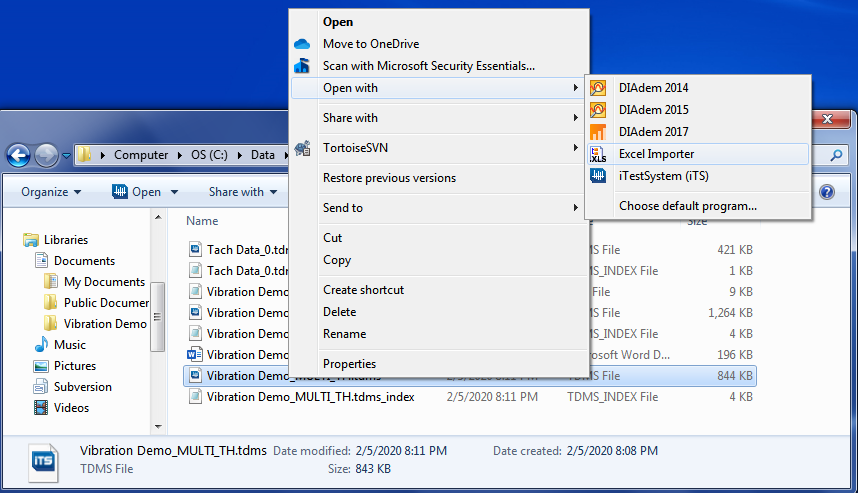
Figure1: Right click on a TDMS file to import into Excel.
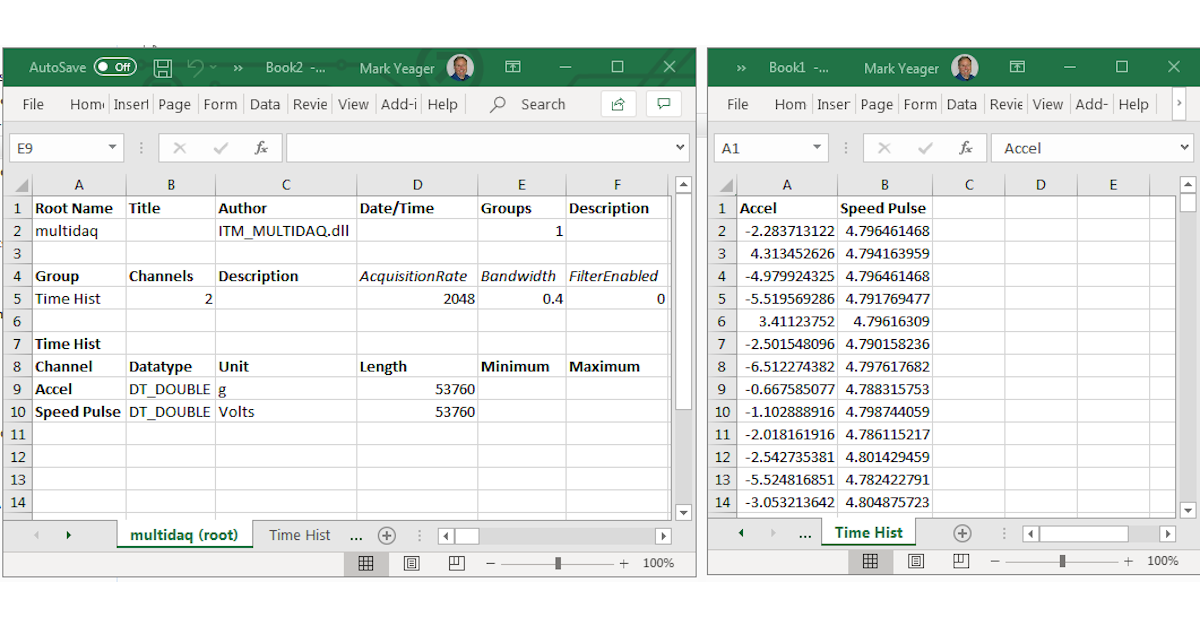
Each time you open a TDMS file in Excel, it will create a new workbook. Each workbook will have multiple sheets, one for the file properties such as the name of the test, date the data was taken, and more. The other sheet(s) will contain the data points plotted as part of the test, which would normally be used to create graphs in TestView Plus.
Now you can save the Excel and share it just like any other XLS file!
Related Links
Auto-Zero Utility Update
Wireless Strain Measurements with iTestSystem
Strain Gauge Installation for Field Testing
For more information about sharing data, iTestSystem Engineering Measurement Software, or test equipment rental, contact Ryan Welker @ (844) 837-8797 x702.
Buried in TDMS files? Talk to the engineers behind iTestSystem about acquiring, analyzing, and sharing your test data.
Related solutions
iTestSystem Software
The engineering measurement platform that acquires, analyzes, and manages TDMS test data. Explore →
Data Acquisition
DAQ hardware and systems that generate the high-fidelity TDMS data behind every test. Explore →
Testing Services
Field and lab testing programs that turn precision measurements into engineering answers. Explore →
Recent insights
-
 Aerospace Engineering, Aerospace Testing, Blue Origin, Engineering, ESCAPADE Mission, Launch Vehicle Engineering, New Glenn, Rocket Reliability, Strain Measurement, structural health monitoring, Structural Testing
How Pre-Launch Structural Testing Ensures Mission Success
When Blue Origin’s New Glenn rocket successfully launched NASA’s ESCAPADE mission to Mars, it marked a historic step forward for commercial launch technology — and a testament to the unseen engineering that happens long before a vehicle ever reaches…
-
 6D Testing & Analysis, Accelerometers, data acquisition systems, design validation, Engineering, engineering measurement, experimental modal analysis, impact hammer testing, mechanical engineering, modal testing, structural dynamics, Structural Testing, vibration testing
Free Engineering Guide: How to Perform Experimental Modal Analysis for Better Structural Insight
Understanding how structures vibrate—and why—is essential across nearly every engineering discipline. Whether you’re working on rotating machinery, industrial equipment, robotics, medical devices, heavy vehicles, consumer products, or building-scale…
-
 AWS IoT Analytics, cDAQ-9189, Channel Synchronization, CompactDAQ, Condition-Based Maintenance, Edge-to-Cloud High-Channel Datalogging, Engineering, Instrumentation, iTestSystem, iTestSystem Automated Analytics, iTestSystem Notification Service, NI-9236, NI-9469, Strain, Stress, structural health monitoring
High Channel Count Synchronous Datalogging
When a manufacturer needed to validate the structural performance of a 38-ton on-highway vehicle, ITM deployed a 200+ channel synchronous datalogging system capable of capturing accelerometer, strain, GPS, and speed data at nearly 2 kS/s per channel…